Settlements
How to automate driver settlements (US car hauling)
To automate driver settlements you first have to admit that a small car-hauling fleet does not have one kind of driver. It has three, each on a different deal, and often a fourth — a truck you co-own with someone. Truck Dispatch Portal models all of them and prints a PDF statement for each on Monday.
Three kinds of trucks, three statements
| Truck | Who pays what | What the statement shows |
|---|---|---|
| Company driver | You own the truck and pay fuel, cargo insurance, IFTA and the logbook. The driver earns a salary percent of gross. | Gross, salary %, cash he took, deductions he agreed to, payout. |
| Owner-operator | He owns the truck and buys his own fuel. He pays you a company fee percent, out of which the dispatcher’s percent and a base percent are paid; the remainder is yours. | Gross, company fee, cargo, cash taken, any corrections, payout to him. |
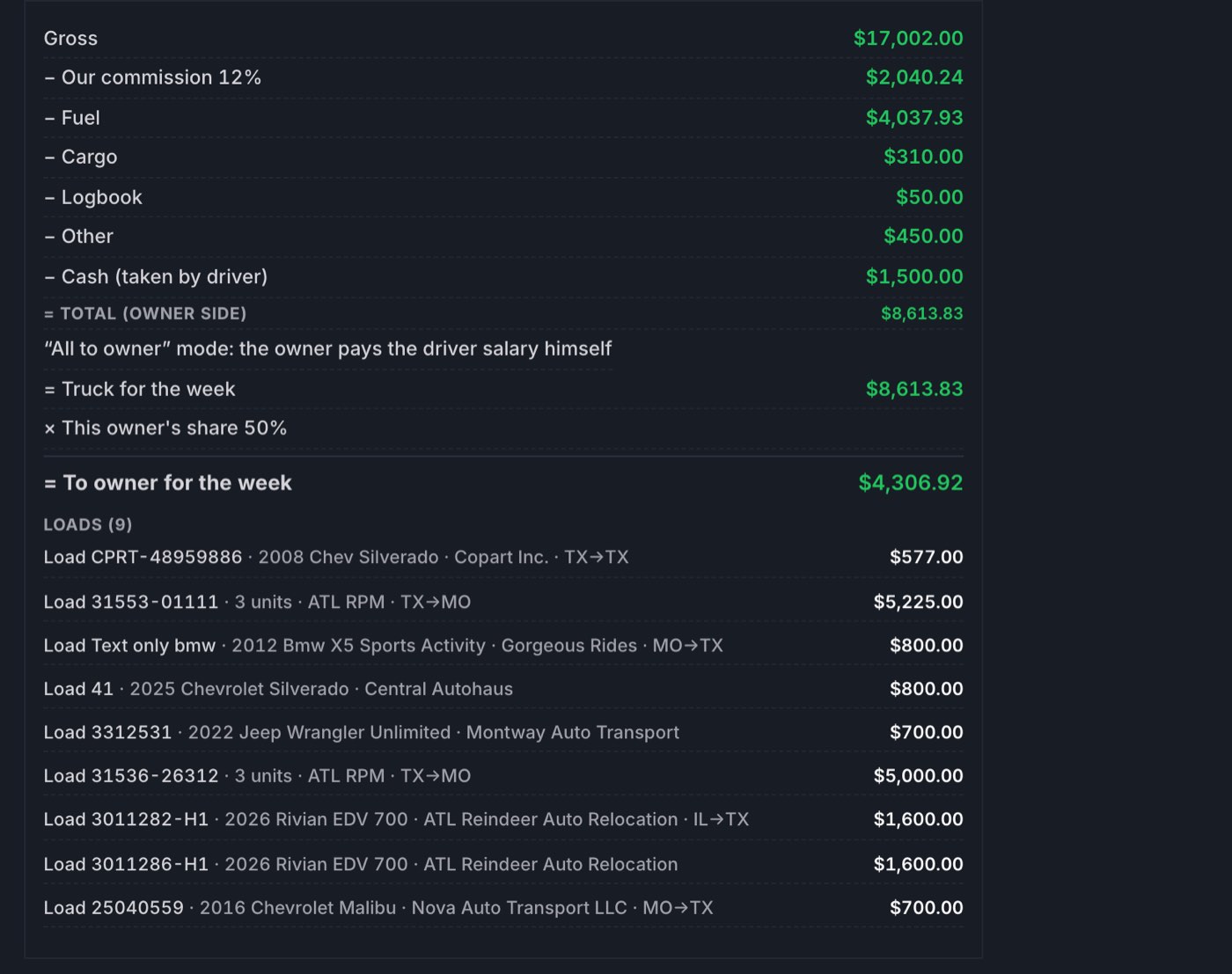
| Fleet-owner truck | Someone else owns the truck and the driver. You run it for a commission. Either “All to owner” (he pays his driver) or “Calculate salary” (you pay the driver and deduct it). | Gross, our commission, fuel, cargo, logbook, other, cash taken, salary if we pay it, owner deductions, to owner. |
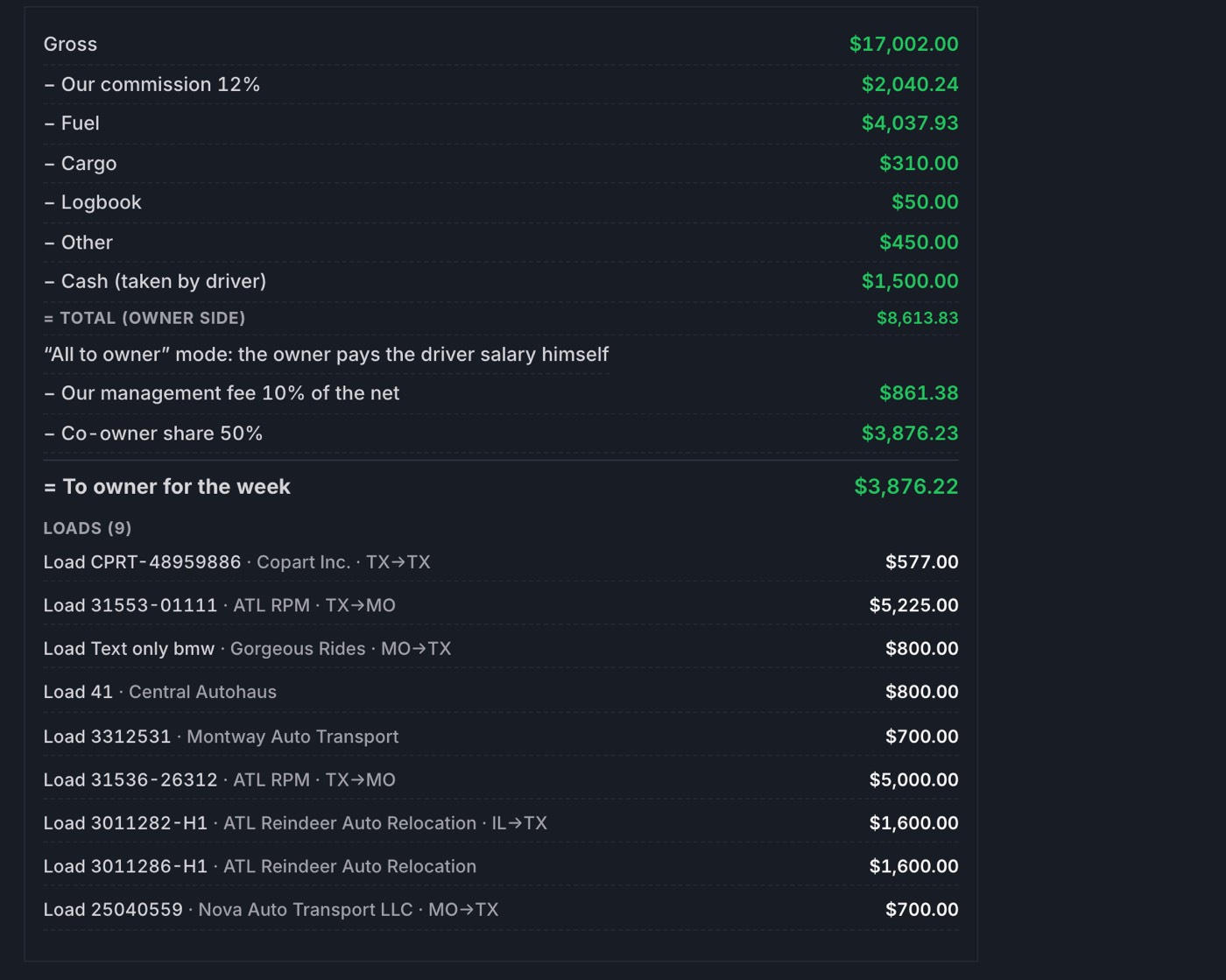
| Co-owned truck | A fleet-owner truck plus a management fee of gross and a split of the net. | The lines above, then “Our management fee” and “Co-owner share” — without naming the other party. |
Rates live on the driver’s card, each with a “from week”
In Settings each driver has a card: type, salary percent, company fee percent, dispatch percent, base percent, cargo per week, IFTA per month, fuel card last four, and the week each of those starts. Change a rate on Tuesday and it applies from the week you name; last Monday’s statement stays as printed. The card is kept out of the working tables on purpose, so nobody changes a percent by accident while typing a load.

Fuel, cargo and IFTA land by themselves
Import the fuel-card statement and every fill-up is matched to a driver by the card’s last four and to a week by its date. The week form shows fuel as one line with the fill-ups under it; the Fuel screen shows the same fill-ups by truck and by week. Cargo insurance is a weekly amount on the card; IFTA is a monthly amount spread across the weeks of the month. None of these are typed again.
Nothing is charged until you say so
Corrections — a broker’s short pay, a damage claim, a late fee, a loan repayment — come in through Load payments. Every line waits there with the payer pre-picked: the driver, the fleet owner, or the company. You press Charge it, or Charge all once the list looks right. A cash line with a check on file can be sent straight to accounting. The point is that an imported workbook never moves money by itself.
The week statement and the PDF
Open a driver’s week and the statement is already there: gross from his delivered loads, each deduction as its own line, cash he took at the door, the payout at the bottom. Print the PDF and send it; the same PDF is what the driver sees in the phone app. The statement runs Monday to Monday for everyone, so a dispute is always about one week and one list of loads.
Two cases that trip up spreadsheets are first-class here. If an earlier transfer underpaid a company driver, you add a negative “other” line: his payout goes up and your income stays flat, as it should. If you took something from a salaried driver that should go back from your own pocket, “Return to driver” raises his payout, lowers your income and leaves the fleet owner untouched.
Co-owned trucks, without awkward statements
A truck you co-own with a fleet owner takes a management fee (say 10% of gross) first, then splits the net after commission and expenses — 50/50 or whatever the deal says. The fleet owner’s statement prints “Our management fee” and “Co-owner share” and nothing more about who the co-owner is. He sees his number and the loads that produced it; your side of the arrangement stays on your screens.
Approve, close, and keep the ledger
Once the statements look right, payouts are approved on the Accounting screen — from the site or from the phone. Checks are recorded against the loads they pay. The period closes, P&L and year-end read from the same weeks, and every driver has a ledger that shows what he was paid, when, and against which statement. If you ever need to argue a week with a driver a year later, the week is still there, exactly as printed.
Start with one week
The honest way to move off a spreadsheet is to run one week in both. Enter the drivers and their deals, import the fuel statement, add the week’s loads, and lay the PDF next to your sheet. Owners usually find two or three cents of rounding and one line they had been forgetting. Then they stop opening the sheet. The rest of the desk →